Skip to content
← Portfolio

Case study  /  Internal tools  /  JPMorgan Chase

Did that subscription actually cancel?

Customers can cancel a subscription on their own, through Bill Shark. When they call to check that it worked, specialists need to see what the customer sees. I designed the subscription views in One Chase Service, the internal screen that call centers and help desks use.

Client
JPMorgan Chase · One Chase Service
Role
Senior UX Designer, internal services design team
Users
Call-center and help-desk specialists
Scope
Subscription views, states and content
Timing
Planned for Q3 2021 delivery
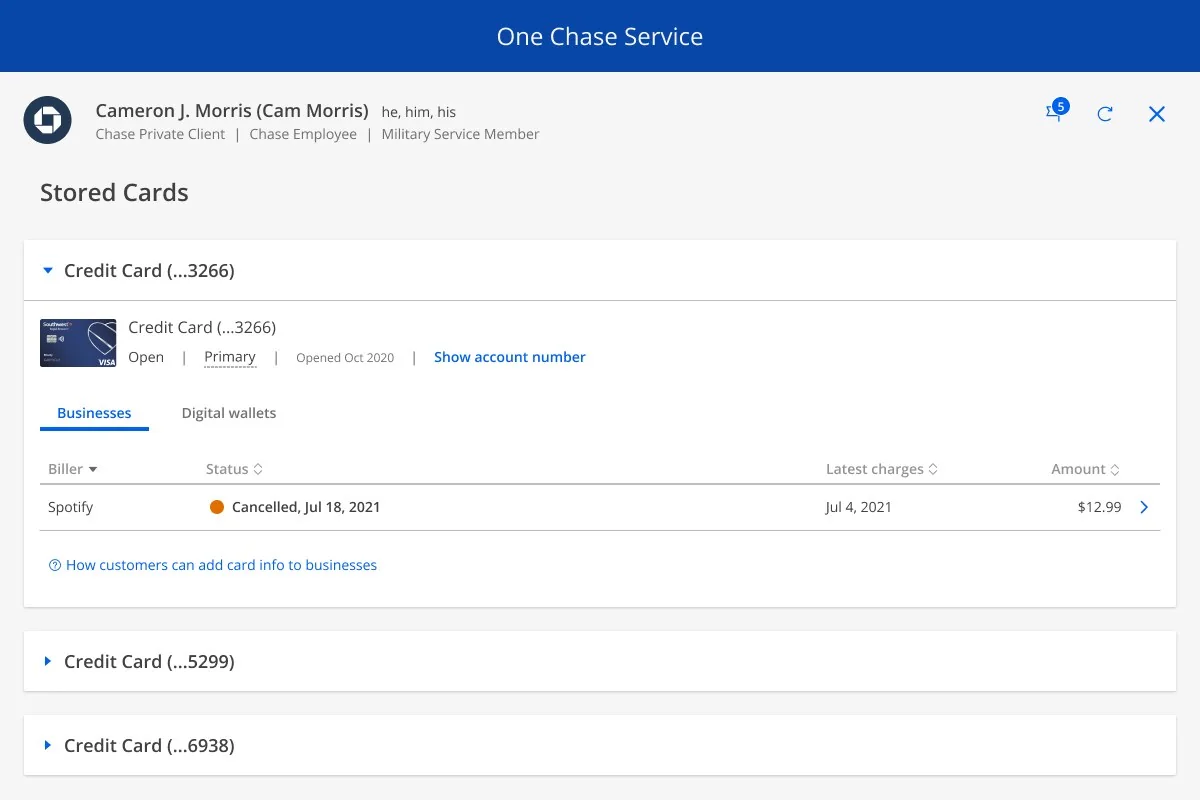
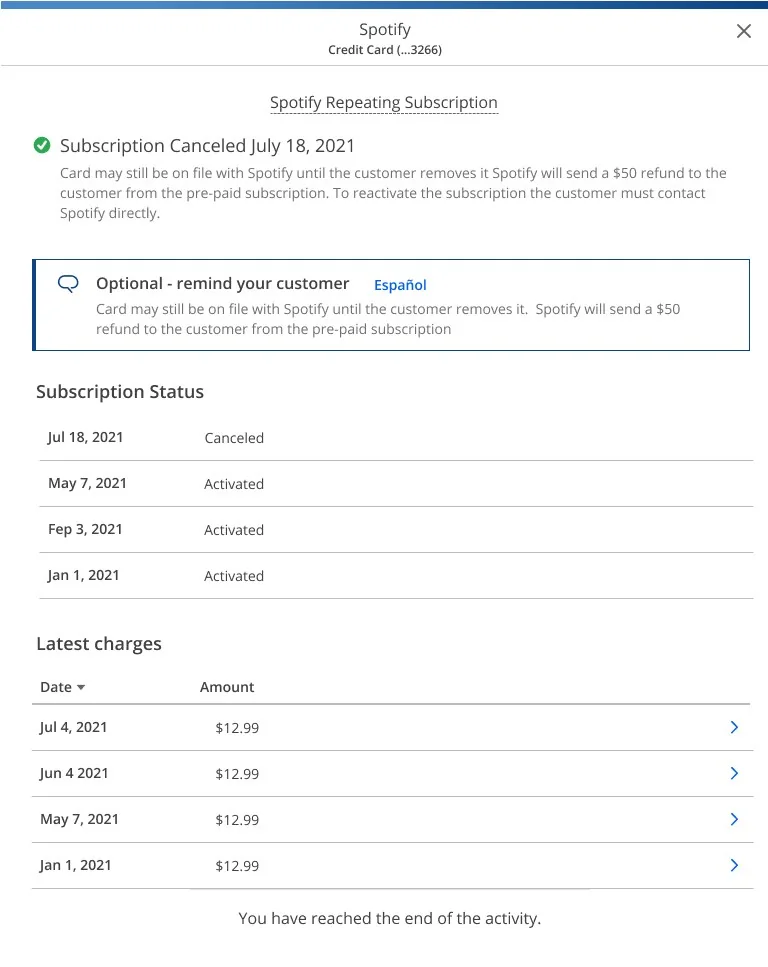
The Stored Cards page in One Chase Service, with a cancelled Spotify subscription listed under a credit card The subscription detail view, with a cancellation banner, an optional reminder for the customer and a status history

01 / The context

Customers cancel on their own. Specialists still get the call.

Bill Shark is a vendor that manages subscriptions for Chase customers. Cancelling is a self-service function in the customer’s digital banking, and it can take up to eight days to go through.

For call-center specialists it is inquiry only. They can look up a subscription and explain it, but they won’t cancel it for the customer.

8

days a cancellation can take

3

states to design

How the service works

01

The customer subscribes

They sign up for a subscription, such as Spotify or Hulu, with their Chase credit card.

02

Bill Shark requests payment

The vendor asks Chase for each payment as it comes due.

03

Chase sends the payment

The payment goes to the subscription.

04

The customer cancels

They do it themselves, in digital. Specialists can only look it up.

02 / The challenge

Not much to show, so every line has to count.

A specialist is answering one question: what happened to this customer’s subscription? The service gives limited information and specialists can’t act on it, so the screens had to be short, clear and honest.

01

Inquiry only

Specialists can look up a subscription but can’t cancel it. The screens explain the status and what the customer can do next.

02

Three states

No cancellations. A cancellation has occurred. And after a cancellation, with any failures and a list of statuses.

03

Live in the admin tool

Bill Shark was bundled with the payments backend inside the existing admin tool, so specialists find it where they already work.

03 / The landing page

Every stored card, every business.

The Stored Cards page lists the customer’s cards. Open one to see the businesses that have it on file and the status of each subscription.

01

Businesses and wallets

Tabs separate the businesses that hold the card from digital wallets.

02

Status at a glance

Each biller shows a colored status and date, such as “Cancelled, Jul 18, 2021”, beside its latest charge and amount.

03

Columns that sort

Biller, status, latest charges and amount can all be sorted.

04

Help in place

A link under the table explains how customers add card info to businesses.

Stored Cards in One Chase Service. Customer shown is sample data.

04 / The detail view

Three versions, one view.

The detail view went through three rounds. Each gave the specialist more of the answer without adding another screen.

Version 1: the charges, with a link to how customers cancel
Version 1: a cancellation banner over the charge
Version 2: the banner leads the list of charges
Version 3: one view with everything the specialist needs

01

Say what happened

A banner at the top gives the cancellation date and what it means: the card may stay on file until the customer removes it, and reactivating means contacting the business.

02

Give the specialist the words

An optional “remind your customer” note, with a link to a Spanish version, helps a specialist explain what happens next.

03

Show the history

A subscription status list shows each activation and the cancellation, with the latest charges beneath it.

05 / The bigger picture

One module in a larger payments tool.

Bill Shark sat beside Request for Payment, which works in a similar way, and both had to feel like the rest of the admin tool. Other payments projects were already on the roadmap.

The longer-term vision was a payments landing page that brings them together: auto payments, mortgage, request for payment and Bill Shark.

On the roadmap

01

A full wires rebuild

Rebuilding wire payments.

02

A status tracker

Built as microservices, replacing the customer experience end to end.

03

Mortgage payments

Payments for home lending.

04

Auto payments

History folded into pending, with a slide-in panel and updated columns.

06 / The working notes

Where the plan took shape.

I take notes by hand. These are from the Bill Shark kickoff: a sketch of how the service works, the three states I planned to design, the timing and the roadmap. Names are blurred.

Kickoff: the plan, and how the service works
Kickoff: three screens, timing, roadmap

07 / The outcome

Designed for the Q3 delivery.

The subscription views were designed for One Chase Service, so a specialist can answer a customer who asks whether a cancellation went through.

What I took from it

01

Design for what the specialist can’t do

They can’t cancel, so the screens answer the question they can: what happened, when, and what to say next.

02

Iterate toward fewer screens

Three versions took a list and a detail view and folded them into one.

03

Design the module, and the tool

Bill Shark was one of several payments modules, so it had to look and work like the rest.